How to stop overspending on food delivery without giving it up
Short answer
To spend less on food delivery without giving it up, first find your real number: log every food purchase for one or two weeks and add up your order history, counting fees and tips. Then set a weekly food amount inside your daily budget, keep delivery for a few set days, pick up or cook the rest, and let a big order shrink the next few days instead of dropping the plan.
Food delivery rarely gets expensive through one big order. It gets expensive because every order costs a bit more than the menu suggests, and ordering again takes a few taps. You do not have to give it up to spend less. First find your real number: log every food purchase for a week or two and add up your order history, counting what you actually paid. Then set a weekly food amount that fits inside your daily budget, keep delivery for a few set days, and pick up or cook the rest. When a big order happens anyway, log it and let it shrink the next few days instead of dropping the plan. All of this works with pen and paper; the last section shows how the My Money app handles it on iPhone.
How much are you really spending on food delivery?
It is easy to guess low, because you remember the food and forget the extras. Get the real figure before changing anything:
- Log every food purchase for one or two weeks. Delivery, takeout, restaurant meals, coffee, snacks and groceries, each at the amount you paid. Eat as you normally would; you want an ordinary week, not a good one.
- Check your order history. Delivery apps keep a list of past orders, and your card or bank statement lists each charge. Add up the last four weeks for a longer view.
- Split the total into groups. Delivery, eating out or pickup, groceries, and coffee and snacks. The largest group is where to start.
Always use the total charged, not the price of the dishes. If you split an order with friends or coworkers, count only your share.
Why does delivery cost more than the menu price?
The menu price is only the start. Depending on where you live and how you order, the total can include:
- A delivery fee. It can be higher for longer distances or at busy times.
- A service fee. A separate charge on top of the food, sometimes a percentage of the order.
- A small-order fee or minimum order. Below a set amount you either pay extra or add items to reach it.
- A tip. Part of the real cost of the meal, so budget for it rather than treating it as an afterthought.
- Add-ons. A drink, a side, a dessert, a bigger size. Each one is small; together they change the total.
- Menu prices. Some restaurants list higher prices in delivery apps than at the counter. If you order from the same place often, compare.
None of this means delivery is a mistake. It means the useful number is what left your account, and that picking up the same meal yourself removes the delivery fee.
How much should you spend on food per day?
There is no right amount for everyone. It depends on your income, where you live and how much you cook. A workable way to set it:
- Start from your daily budget. That is the money for everyday spending after rent, bills and savings are taken out. If you do not have one yet, the daily budget method explains how to work it out.
- Turn it into a week. Multiply by 7. Food spending is lumpy, with one grocery shop and a couple of delivery nights, so a weekly food amount is easier to keep than a daily one.
- Decide the food share. Start close to what you spend now and trim, rather than picking a number you will break on day two. Leave enough for transport, household things and fun.
- Plan delivery inside it. At your usual order total, decide how many delivery meals fit, and let groceries and pickup cover the rest.
Worked example: from $159 to $120 a week
The numbers below are made up to show the math, not a recommended budget. Say your daily budget is $30, so a week is $30 × 7 = $210 for everything that is not rent, bills or savings. Two weeks of logging showed 8 delivery orders totaling $192, an average of $24 an order with fees and tip included.
Example: a weekly food plan inside a $30 daily budget
| Food | Before (per week, from the log) | Plan (per week) |
|---|---|---|
| Delivery | $96 (4 orders) | $48 (2 set nights) |
| Eating out and takeout | $21 | $16 (one pickup) |
| Groceries | $28 | $44 |
| Coffee and snacks | $14 | $12 |
| Food total | $159 | $120 |
| Left for everything else (from $210) | $51 | $90 |
Delivery stays, on two set nights a week, ordered without the extras. The plan spends $16 more on groceries so there is food at home on the other nights. Food drops by $39 a week ($159 − $120), or $156 over four weeks, and the money for transport, household things and going out rises from $51 to $90. Per day, the food plan comes to about $17 ($120 ÷ 7 = $17.14).
How do you stop ordering takeout so often?
Rules decided in advance work better than willpower at 8 p.m. Pick two or three:
- Delivery on set days. For example Friday and one weeknight. On the other days, the question is already answered.
- Pick up instead. If the place is on your way home or a short walk away, order for pickup. There is no delivery fee and no delivery tip.
- Cook once, eat twice. Make a double batch of something simple and keep the second portion for tomorrow's lunch, or for the night you would normally order.
- Keep a tired-night meal. Frozen dumplings, eggs and rice, pasta and a jar of sauce. The meal you can make with no energy is the one that replaces delivery.
- Order the meal, not the minimum. If you are short of a minimum order, compare the small-order fee with the item you would add, and take whichever costs less.
- Decide before you are hungry. Choose dinner in the afternoon. Hungry and tired is when extras go into the basket.
- Turn off promo notifications. A discount on something you were not going to buy is not a saving.
What should you do after a big order?
Log it the same evening, at the full amount. Then let it come out of the next few days instead of writing off the week.
Example: a $54 dinner on a $30 day
You spent $6 on coffee in the morning. In the evening you order dinner: $38 of food, then $9 in delivery and service fees and a $7 tip, so $54 in total ($38 + $9 + $7). The day comes to $60 ($6 + $54), which is $30 over your $30 budget.
Taken from tomorrow alone, that leaves tomorrow at $0. Spread over the next three days, it is $10 less a day ($30 ÷ 3), so $20 a day until it is covered.
A planned delivery night at your usual $24 fits inside a $30 day. It is the unplanned or oversized order that needs spreading. The reverse holds too: a cheap day of leftovers carries forward and makes room for the next order.
How does My Money help you spend less on food delivery?
My Money is a free iPhone app built around one number: how much you can still spend today. It fits the method above like this:
- Check the number before you order. The Home screen shows what is left to spend today and what you have spent today, so you know before checkout whether dinner fits.
- Log right after ordering. Type a line such as "Dinner delivery 24" and the amount and category are filled in. Or tap the mic and say it; speech recognition runs on the device. The Quick Log action for Siri, Shortcuts and the Action Button logs a line of text without opening the app and replies with the amount logged and what is left to spend today. The Action Button guide shows the setup.
- Or log from the payment record. Pick up to 5 screenshots of payment records or receipts. The text is read on the device and turned into drafts you can edit or uncheck, and nothing is saved until you tap save.
- Big orders spread on their own. Spend more than the daily amount and the coming days get less. Spend less and the difference carries forward, up to 5 days' worth.
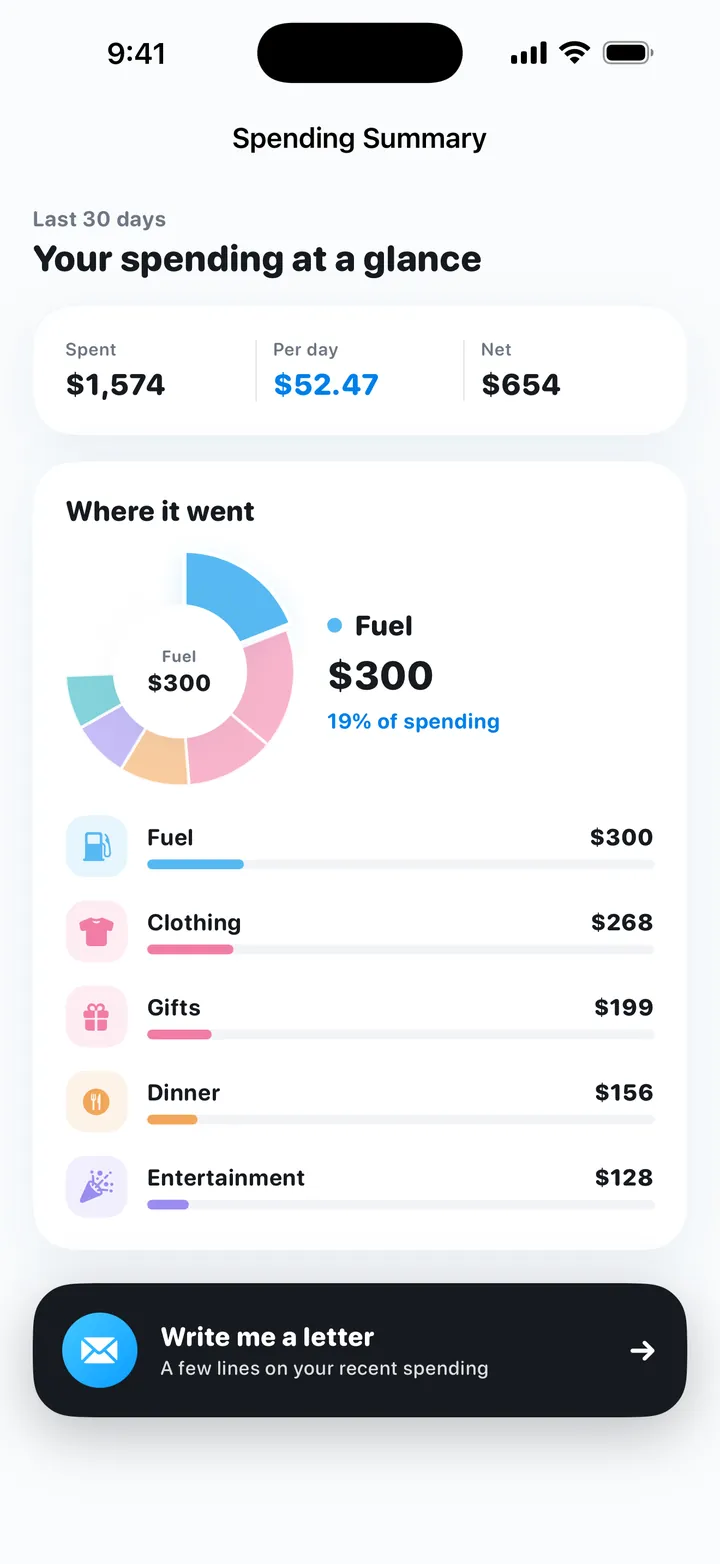
- See the food share. The spending summary covers the last 30 days: total spent, per-day average, and a donut chart with a ranked list of categories, so you can see where food sits next to everything else. Daily, weekly and monthly recaps compare your spending with the budget, and a short letter from My Money names your biggest category and heaviest day.
- A wheel for "what should I eat tonight?" For fun, the choice wheel spins between options you add. Put a couple of home meals on it next to the takeout.
Limits worth knowing: My Money is iPhone only (iOS 17 or later). It does not connect to your bank, card or delivery apps, so you log each order yourself. There is no account and no ads, and records are stored on your iPhone.
Try My Money on iPhone
Your monthly budget as one number: what you can still spend today. Log by typing, voice or a bill screenshot. Free, no account, no ads.
FAQ
Why am I spending so much on food delivery?
Each order costs more than the menu price, and ordering again takes a few taps. Delivery and service fees, tips, small-order fees and extras added to reach a minimum all sit on top of the food. Log the total you paid for a week or two to see the real figure.
How much should I spend on food per day?
There is no universal number. Start from what you spend now, then set a weekly food amount inside your daily budget. In this guide's example, $120 a week for food out of a $210 weekly budget works out to about $17 a day.
How do I stop ordering takeout so often?
Decide your delivery days in advance, keep one easy meal at home for tired evenings, pick up instead of having it delivered when the place is close, and cook once to eat twice. Deciding before you are hungry works better than deciding inside the app.
What should I do after a big delivery order?
Log the full amount you paid, then let the overspend come out of the next few days. In the example, a day that ends $30 over a $30 budget, spread over three days, means $20 a day until it is covered.
Can My Money track my delivery orders automatically?
No. My Money does not connect to banks, cards or delivery apps. You log each order yourself by typing a line such as Dinner delivery 24, by voice, or from a screenshot of the payment record.
Try My Money on iPhone
Your monthly budget as one number: what you can still spend today. Log by typing, voice or a bill screenshot. Free, no account, no ads.
Keep reading
 The no-spend challenge: rules, what counts as essential, and a gentler way to do itHow to do a no-spend challenge: pick a weekend, week or month, list your essentials, prepare, handle slips, or try a gentler version with a daily budget.
 The daily budget method: turn your monthly budget into one number for todayTurn a monthly budget into a daily spending limit: take-home pay minus bills and savings, divided by days. Carry-over rules and a worked example.
 How to log expenses with the iPhone Action Button, Siri, Back Tap and ShortcutsPress the Action Button, say "lunch 12", and the expense is logged. How to set up My Money's Voice Log and Quick Log with Shortcuts, Siri and Back Tap.