About My Money
My Money is a free iPhone app that turns a monthly budget into one number: what you can still spend today. It is made by an independent developer and works without an account, a bank login or a server copy of your ledger.
What My Money is
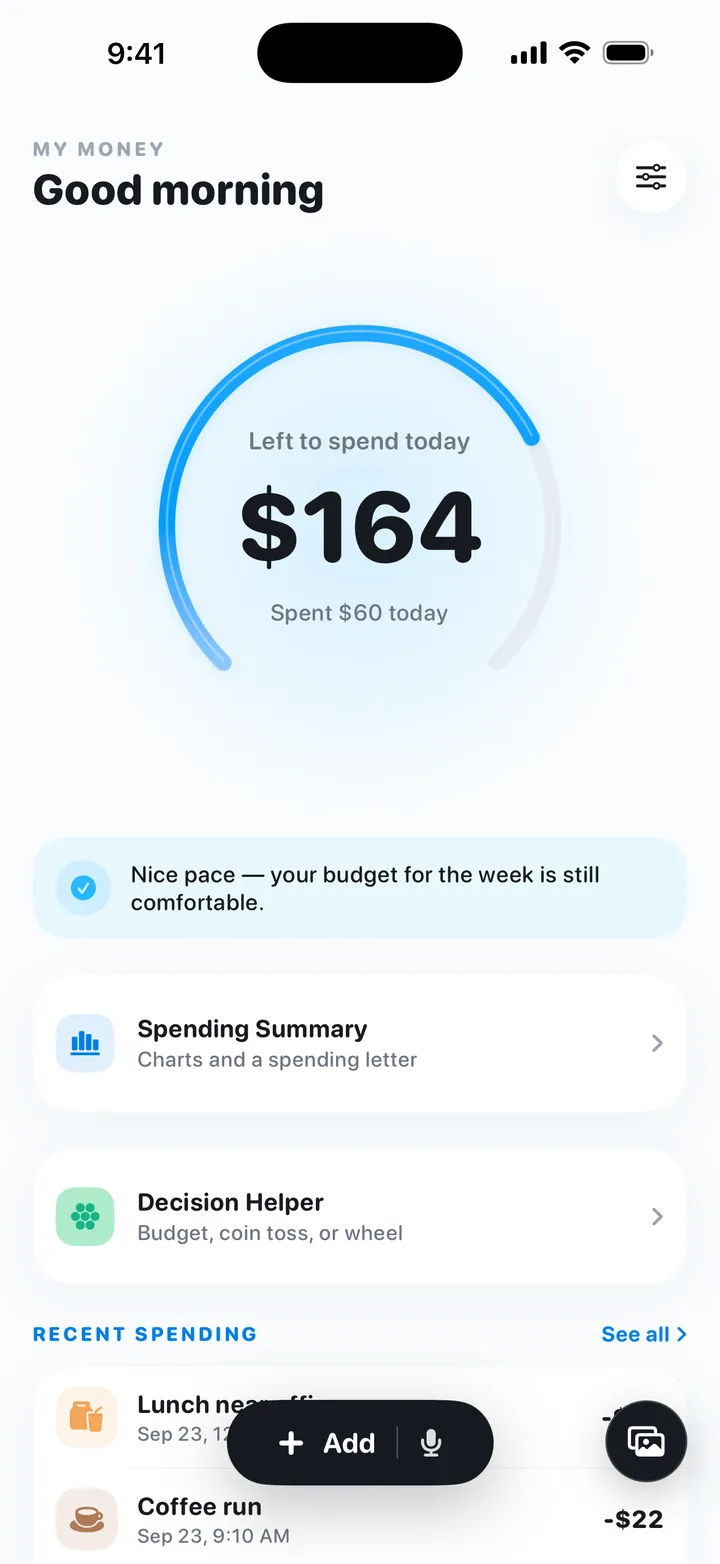
My Money is a budgeting and expense-tracking app for iPhone, listed on the App Store as “My Money: Budget & Expense Log” and running on iOS 17 or later. You set a monthly budget once, either by typing an amount or by answering a short budget assessment, and the Home screen then shows one number: how much you can still spend today. You log spending by typing a line such as “Coffee 5”, by voice, or by choosing up to 5 bill screenshots or photos, and the Voice Log and Quick Log actions let you log from the Action Button, Siri or Shortcuts. It is free, shows no ads, and works in English and Simplified Chinese.
Why it exists
A monthly budget is easy to set and hard to follow. A monthly total tends to tell you how the month went once it is over, when the spending has already happened and the only thing left to do is promise to do better next month.
My Money moves the budget into the day. Your monthly amount becomes a daily one, and every entry changes today’s number straight away, so you can see during the month how you are doing and adjust tomorrow rather than next month. Spend less than the daily amount and the difference carries into the following days; spend more and the coming days get less. Carry-over is capped at 5 days’ worth, so an unused week doesn’t turn into one oversized “left to spend today” number.
This only works if logging is quick, which is why an entry can be a typed line, a spoken sentence or a screenshot you already have. The idea itself does not need an app: the daily budget method explains how to run it with pen and paper, and the daily budget calculator works out your own number.
Design principles
- No account. There is no sign-up and no sign-in. You set a budget on first launch and start logging.
- No bank login. My Money never connects to a bank or card. Every entry is logged by you, by typing, voice or screenshots.
- On device by default. Records are stored on the iPhone, and the developer keeps no server copy of your ledger. Budget math always runs on the device; entry parsing and insights do too by default, using Apple’s on-device model on compatible iPhones and local rules and templates otherwise. Speech is recognised on the device and screenshots are read on the device; audio and images are never uploaded.
- Online AI only with consent, feature by feature. The optional online AI (DeepSeek, through the developer’s relay on Vercel) is off by default. Each feature asks before anything is sent, only that request’s text is sent, and you can switch it off at any time. The privacy policy lists exactly what each feature sends.
- The numbers come from fixed rules. Budget plans, balances and carry-over are calculated on the device by fixed rules, not by AI.
- Honest recaps. Daily, weekly and monthly recaps compare your spending with the budget, and when there isn’t enough data they say so plainly.
- Free, without ads or tracking. No ads, and no third-party analytics or tracking SDK.
Release history
| Version | Released | What it brought |
|---|---|---|
| 1.0 | 2026-09-11 | First App Store release: the monthly budget turned into a daily number with carry-over, the budget setup (a direct amount or an assessment), logging by typing and voice, the Voice Log and Quick Log shortcuts, spending insights, and the decision coin and wheel. Everything was processed on the iPhone. |
| 1.0.1 | 2026-09-25 | Screenshot and photo entry (up to 5 images at a time, read on the device); Home Screen widgets in two sizes, with an option to hide amounts; daily, weekly and monthly recaps; optional online AI (DeepSeek), off by default and asked per feature; a redesigned spending letter and setup. |
1.0.1 is the current version. Everything described on this site refers to it.
Try My Money on iPhone
Your monthly budget as one number: what you can still spend today. Log by typing, voice or a bill screenshot. Free, no account, no ads.
Who makes it
My Money is made by an independent developer. Questions, bug reports, feedback and data requests go to snaptidyapp@outlook.com. Common questions are answered in the FAQ and on the support page, and the privacy policy describes what the app stores and what the optional online AI sends.
Writing about My Money? The press kit has descriptions, key facts and images.